Overview
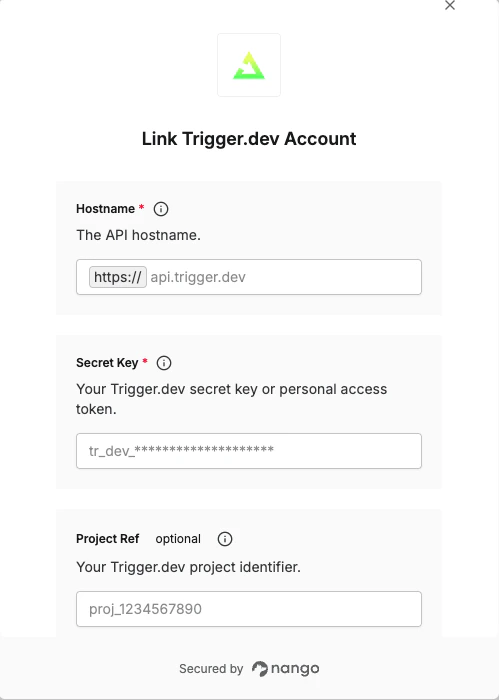
To authenticate with the Trigger.dev API, you will need:- Secret Key or Personal Access Token — A key to authenticate your requests
- Project Ref — Your Trigger.dev project identifier (required when using a PAT)
- Environment — The target environment (required for some PAT operations)
- Base URL — The API base URL (
api.trigger.devfor cloud, or your self-hosted hostname) - Preview Branch — The preview branch to target (optional, preview environment only)
Prerequisites
- A Trigger.dev account.
Instructions
Step 1: Get your secret key or personal access token
Trigger.dev supports two key types. Choose based on your use case:
To get a secret key:
- Select your project from the top-right corner, then select the environment from the dropdown.
- Go to Manage → API Keys.
- Copy the key for the environment you selected.

- Click the dropdown in the top-left corner and select your account.

- Select Personal Access Tokens.
- Click Create new token, give it a name, and copy the generated token (
tr_pat_…).

Step 2: Find your project ref
Your project ref is the unique identifier for your project. To locate it:- Go to Project settings → General.
- Copy the value under Project ref (e.g.
proj_1234567890).

Step 3: Find your environment
The environment identifies which environment to target. Valid values aredev, staging, prod, and preview. This is only required when using a PAT for environment-specific operations such as managing environment variables.
Step 4: Set your base URL
Enter the hostname for your Trigger.dev instance:- Cloud:
api.trigger.dev - Self-hosted: your own hostname (e.g.
trigger.example.com)
Step 5: Set your preview branch
If you are targeting thepreview environment and need to scope operations to a specific branch, enter the branch name (e.g. feature-xyz). This field is optional and has no effect outside the preview environment.
Step 6: Enter credentials in the Connect UI
- Open the form where you need to authenticate with Trigger.dev.
- Enter your Secret Key or PAT, and optionally your Project Ref, Environment, Base URL, and Preview Branch.
- Submit the form to connect your account.