Overview
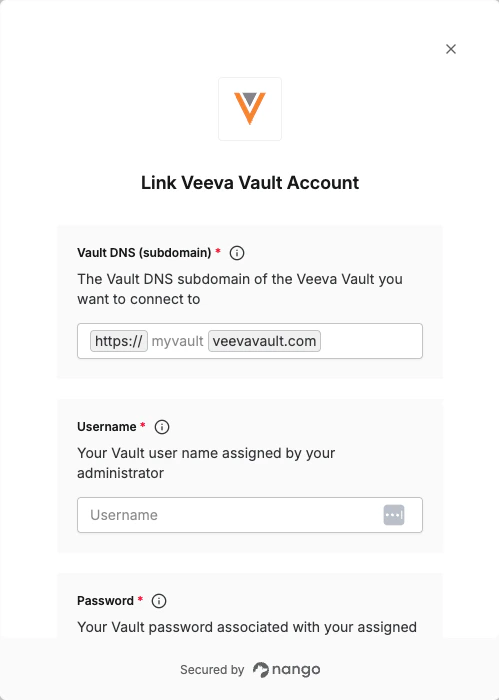
To authenticate with Veeva Vault, you will need:
- Vault DNS (subdomain) - The subdomain of your Veeva Vault instance.
- Username - Your Vault user name assigned by your administrator.
- Password - Your Vault password associated with your assigned Vault user name.
This guide will walk you through finding your Vault DNS (subdomain) and obtaining your Username and Password for Veeva Vault.
Prerequisites:
- You must have a registered Veeva Vault account with administrator access or user credentials.
Instructions:
Step 1: Finding your Vault DNS (subdomain)
- Log in to your Veeva Vault instance.
- Check the URL in your browser’s address bar. Your Vault URL will typically be in the format:
https://<my-vault>.veevavault.com
- Your Vault DNS (subdomain) is the subdomain part of your Vault URL (e.g.,
my-vault). This is the portion before .veevavault.com.
Step 2: Obtaining your credentials
Your Username and Password are the credentials assigned to you by your Veeva Vault administrator:
- Username: This is your Vault user name that was assigned by your administrator when your account was created.
- Password: This is the password associated with your Vault user name.
Ensure you have the necessary permissions to access the Veeva Vault API. If you encounter authentication issues, contact your Veeva Vault administrator to verify your account has API access enabled.
Step 3: Enter credentials in the Connect UI
Once you have your Vault DNS (subdomain), Username, and Password:
- Open the form where you need to authenticate with Veeva Vault.
- Enter your Vault DNS (subdomain), Username, and Password in their respective fields.
- Submit the form, and you should be successfully authenticated.
 You are now connected to Veeva Vault.
