

Architecture overview
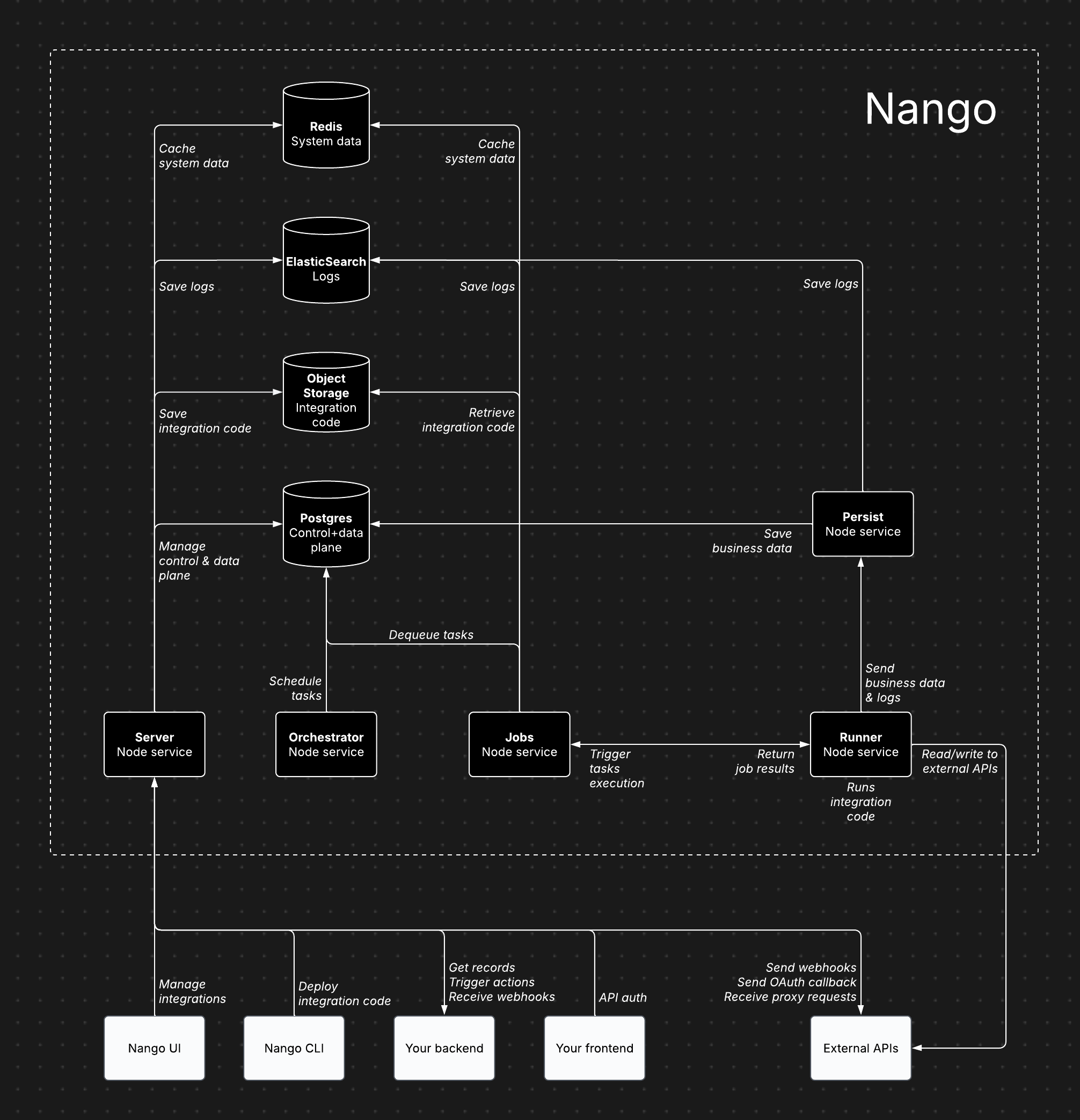
Nango's infrastructure components
Architecture components
Nango consists of several core services, each handling specific responsibilities:- Server (Node service): Powers the dashboard, API, proxy requests, and incoming/outgoing webhooks.
- Orchestrator (Node service): Manages task scheduling and state tracking.
- Jobs (Node service): Processes tasks and dispatches them to the Runner.
- Runner (Node service): Executes integration code and interacts with external APIs.
- Persist (Node service): Stores synced records and logs.
- Postgres: Stores data for the control plane, API credentials, scheduled tasks, and synced records.
- Object Storage (e.g. S3): Stores compiled integration code for execution by the Runner.
- ElasticSearch: Stores execution data.
- Redis: Caches system data, including socket information, token refresh locks, and rate limits.
Cloud vs. self-hosted architecture
The Nango architecture is largely the same for both Cloud and Enterprise self-hosting. This ensures self-hosted instances benefit from continuous dogfooding and load testing. The primary differences are:- In the Cloud version, the Runner service runs as isolated instances per customer.
- The Postgres database is segmented by use case (control plane, task scheduling, synced records).
Features
All paid features available on Nango Cloud are also included in the Enterprise self-hosted edition.Plan requirement
An Enterprise plan subscription is required. Enterprise Self-Hosted pricing contain a fixed annual license and maintenance fee, plus a fraction of the cloud usage-based fees since infrastructure is on the customer side.Intended users
Inteded for large and/or regulated enterprises.Deployment
By default, Nango is deployed using Helm charts. Custom deployments (e.g., ECS) are possible with our guidance.Updates
Managed image updates are published on a two-month cadence, with occasional hotfixes as needed. Notifications about new releases will be posted to your dedicated Nango Slack channel. You can also subscribe to release notifications on theNangoHQ/managed-image-releases repository:
- GitHub: watch the repository, select Custom, and enable Releases.
- RSS/Atom: subscribe to
https://github.com/NangoHQ/managed-image-releases/releases.atom, which can be wired into Slack, Microsoft Teams, RSS readers, or internal automation.
Image tags
Managed image tags follow this format:managed-release-version: Semantic version for the managed image lifecycle (major = breaking, minor/patch = features/fixes)application-version: Semantic version of the Nango application baked into the imagecommit-sha: Full Git commit hash of the released source
application-version specified in the tag for compatibility.
Versions and policy
You can find the latest version inmanaged-manifest.json on managed-image-releases (mirrored from NangoHQ/nango on each release). The in-repo CHANGELOG.md tracks release history.
Each managed release maps to a specific source commit, and published image tags are never changed after release. Customers are encouraged to stay reasonably current with managed image releases.
See the full changelog for details on each release.
Cloud provider support
Supports all major cloud providers (AWS, GCP, Azure).Recommended configuration
- 5 Node services (Server, Persist, Runner, Jobs, Orchestrator): 1 CPU, 2GB RAM per service
- Postgres database: 2 CPU, 8GB RAM, 128GB storage
- Redis data store: 128MB
- ElasticSearch data store: 2 vCPU, 1GB RAM, 30GB storage
- Object storage (e.g. S3): less than 500MB of storage
Scaling
The default configuration supports 1M+ sync/action executions per day (assuming ~2s execution time per action/sync). Auto-scaling is not provided out-of-the-box yet, but the default configuration scales far. We can guide you on configuring auto-scaling when needed. Bottlenecks mostly depend on:- Action/sync execution time: solved by scaling the Runner service vertically, then horizontally.
- Cached records & size (for sync functions only): solved by scaling Postgres vertically.
Data storage
- Postgres: Stores data for the control plane, API credentials, scheduled tasks, and synced records.
- Object Storage (e.g. S3): Stores compiled integration code for execution by the Runner.
- ElasticSearch: Stores execution data.
- Redis: Caches system data, including socket information, token refresh locks, and rate limits.
Using existing data stores
Yes, Nango is flexible with data store setups. However, we recommend a separate instance for independent scaling.Internet access requirements
- Server: Required for proxy requests, credential management, and incoming/outgoing webhooks (inbound & outbound traffic).
- Runner: Required for reading/writing data from external APIs during sync and action executions (outbound traffic only).
Exporting metrics & logs
Yes, metrics and logs can be exported to any monitoring tool using our OpenTelemetry Export add-on. Additional metrics and logs can be added upon request.Datadog providerConfigKey metric tag
Self-hosted deployments that send DogStatsD metrics to their own Datadog instance can opt into tagging selected operational metrics with providerConfigKey (the unique key of a configured integration, for example github-prod).
This is off by default. Leave it off unless you need per-integration granularity; providerConfigKey usually has much higher cardinality than account count.
providerConfigKey tag whenever that identifier is known at the call site.
Email service
Nango uses emails for account verification, password reset, and sending invitations, etc… Any SMTP server can be configured to be used by Nango for these email communications.Encryption key
You must provide your own encryption key via theNANGO_ENCRYPTION_KEY environment variable to enable encryption at rest. It encrypts credentials in the control-plane database as well as data in the records cache. Without this key, credentials are stored unencrypted.
The records cache always requires this key. If you run sync functions that persist records, the persist and records services fail to store or retrieve records when NANGO_ENCRYPTION_KEY is not set—they do not fall back to plaintext.
The encryption key must be a base64-encoded 256-bit (32-byte) key. Key rotation is not supported yet—changing the key after initial setup will cause decryption failures. Plan your key management accordingly.
Data retention configuration
The default retention period for deleted connections is 31 days. You can configure this via theCRON_DELETE_OLD_CONNECTIONS_MAX_DAYS environment variable.
Feature flags
Nango gates some behavior behind feature flags. Flags are served by the provider set inNANGO_FLAG_PROVIDER, which defaults to noop, so every flag uses its built-in default.
To serve flags from environment variables instead, set NANGO_FLAG_PROVIDER=env, then set one variable per flag, named after the flag key uppercased with dashes replaced by underscores and prefixed with NANGO_FEATURE_FLAG_:
true for the audit-trail flag on every account on the instance. Flags with no variable set keep their built-in default. Boolean flags accept true or false. A value that doesn’t match the flag’s type is ignored, and the flag keeps its default.
The variables apply to the whole process, so there is no per-account targeting or gradual rollout. Set them on every service that evaluates the flag, and note that each service reads them at startup.
Two-factor authentication
Two-factor authentication is behind themfa flag, which only the server evaluates. Set these on the server service to enable it:
Free self-hosting
A limited free self-hosting option is available for hobby projects. It is intended for lightweight deployments that need Auth and Proxy, without the managed features and support included with Enterprise self-hosting or Nango Cloud. For more details, see the pricing page or schedule a call to discuss the Enterprise self-hosted version.Feature availability
Server URL, callback URL, and custom domains
Add server environment variables for the instance URL and port in the.env file or directly in your hosting provider:
<INSTANCE-URL>/oauth/callback.
You can customize the callback URL by updating the “Callback URL” field in the “Environment Settings” tab in the Nango admin.
If you are using a custom domain, update
NANGO_SERVER_URL to match it./ keeps dashboard API requests on whichever host served the page. Callback and webhook URLs still use NANGO_SERVER_URL. Set an absolute URL instead if the dashboard is hosted separately from the API.
Management MCP server
The Management MCP server runs as part of the main Nango server. To enable it, configure a dedicated hostname and route traffic for that hostname to the Nango server:NANGO_SERVER_URL. Nango uses the request hostname to distinguish Management MCP traffic from the public API. Restart the Nango server after setting the environment variable; the Management MCP endpoint is then available at https://mcp.example.com/mcp.
Connect UI
Nango Connect is available for self-hosted deployments in the main Docker image.http://localhost:3009.
If you are using a custom domain, update
NANGO_PUBLIC_CONNECT_URL to match it.Hosting under a base path
Connect UI works under any base path, for example behind a reverse proxy that routes services by path. SetNANGO_PUBLIC_CONNECT_URL to the full URL including the path:
/nango/connect/assets/app.js must reach Connect UI as /assets/app.js.
Connect UI is a single-page app: the server must respond with index.html for any path that isn’t a built asset, including the base path without a trailing slash. Nango’s static file server handles this out of the box; if you serve the built dist from your own static host, enable its SPA fallback.
See Auth for the end-user connection flow.
Persistent storage
If you deploy with Docker Compose, the bundled database uses local container storage. This is not appropriate for production. Connect Nango to an external Postgres database by setting the database environment variables:NANGO_DATABASE_URL must be URL encoded.
Nango is incompatible with connection poolers using
pool_mode=transaction. Use a direct database connection or configure the pooler to use a different mode.RECORDS_DATABASE_URL:
RECORDS_DATABASE_URL must be URL encoded. If it is not specified, records are stored in the main database.
External Redis
The bundled Redis is fine for local use but not for production. Connect Nango to an external Redis (or Valkey) with either a full URL or discrete variables:rediss:// scheme (or discrete variables, which default to TLS) to enable in-transit encryption.
IAM / short-lived token authentication
Managed Redis with IAM authentication (for example GCP Memorystore for Valkey) uses a short-lived token as the password and requires the token to be refreshed before it expires. Instead of a staticNANGO_REDIS_AUTH, point Nango at a file that an external process (such as a sidecar) keeps up to date:
rename() it into place — so a reconnect never reads a half-written token and fails authentication. When NANGO_REDIS_AUTH_TOKEN_FILE is set, do not embed credentials in NANGO_REDIS_URL.
The runner boundary has the same set of variables prefixed with NANGO_CUSTOMER_REDIS_ (for example NANGO_CUSTOMER_REDIS_AUTH_TOKEN_FILE); it falls back to the system Redis when unset.
Securing your instance
Proxy base URL override hardening
The proxy can send authenticated requests to external APIs. Some proxy calls accept a base URL override (HTTP headerBase-Url-Override, SDK baseUrlOverride, or an integration custom.baseUrl) to target a host that differs from the provider’s default API base URL.
Because the proxy makes outbound HTTP requests from your Nango server (and from the runner for sync and action scripts), a caller with permission to use the proxy could use an override to reach hosts that were not meant to be exposed—such as cloud metadata services or localhost on the host making the request. This is a classic SSRF risk.
By default, Nango keeps base URL override enabled and blocks override targets and redirect hops whose hostnames match a built-in denylist (cloud metadata and loopback addresses). Configure these environment variables and restart the server and runners after changes:
Operator guidance:
- Production: keep the default denylist. Add environment-specific hosts if your deployment exposes additional internal endpoints.
- Legitimate localhost overrides (dev only): set
NANGO_PROXY_BASE_URL_OVERRIDE_DENYLIST='[]'to restore fail-open behavior. - No overrides at all: set
NANGO_PROXY_BASE_URL_OVERRIDE_ENABLED=false.
Outbound URL policy (DNS rebinding, private IPs, redirects)
Beyond the hostname denylist, Nango routes every outbound connection on the proxy, customer webhook delivery, anduncontrolledFetch paths through DNS-pinning agents that re-validate the resolved IP address — closing DNS-rebinding and redirect-to-internal-address SSRF holes. The behavior is controlled by NANGO_OUTBOUND_URL_POLICY, a JSON object (applied on top of the denylist). It propagates automatically to runners.
The mode field selects how hostnames are filtered:
denylist(default): every destination is reachable except hostnames on the denylist (plus the IP-based protections below). This is the out-of-the-box mode, since the denylist always carries the secure defaults.allowlist: only hostnames inallowlistare reachable (a leading.matches subdomains); everything else is rejected. The denylist and the IP-based protections still apply on top, so allowlist is strictly more restrictive — a listed hostname that resolves to a blocked IP is still rejected.permissive: no hostname-based filtering (the IP-based protections below still apply). You only reach this mode deliberately — either by emptying the server denylist with no explicit mode (see below), or by settingmode: "permissive".
The IP-based protections apply in every mode, including
permissive. Loopback (127.0.0.0/8, ::1) and unspecified addresses are always blocked; private/RFC1918/CGNAT addresses (blockPrivateIps) and link-local addresses — including the cloud-metadata IP 169.254.169.254 (blockLinkLocal) — are blocked by default.The denylist is never empty by default — it is always seeded with the secure defaults (localhost, metadata.google.internal, 169.254.169.254, …). It only becomes empty if you explicitly opt out: either NANGO_PROXY_BASE_URL_OVERRIDE_DENYLIST='[]' (server only, which then selects permissive) or mode: "permissive". Even then, only hostname string matches such as localhost are dropped — literal or resolved internal IPs stay blocked unless you also set blockPrivateIps/blockLinkLocal to false. Runners re-apply the secure denylist defaults even when the server has emptied its denylist; note an explicit mode: "permissive" empties the denylist everywhere, runners included.
Each resolved address (including on every redirect hop) is validated; in
allowlist mode, only listed hostnames are reachable regardless of IP.
The same DNS-pinning protection also covers OAuth/token flows (token exchange, refresh, AWS STS, and JWT-bearer token endpoints). These use a separate overlay, NANGO_OUTBOUND_URL_POLICY_OAUTH, applied on top of NANGO_OUTBOUND_URL_POLICY but with the same JSON shape. The only difference is the default: blockPrivateIps is false for OAuth so self-hosted integrations whose token endpoints live on a private network keep working. Loopback and unspecified addresses stay blocked regardless. Link-local/metadata addresses (including the cloud-metadata IP 169.254.169.254) stay blocked by default through blockLinkLocal, but that check is disabled if you set blockLinkLocal:false. Lock OAuth down to public hosts only by setting blockPrivateIps:
Securing the dashboard
By default, the dashboard of your Nango instance is open to anyone who can access your instance URL. You can secure it with Basic Auth by setting the following environment variables and restarting the server:Encrypting sensitive data
You can enforce encryption of sensitive data, including tokens, API keys, and app secrets, by setting a 256-bit base64-encoded key:NANGO_ENCRYPTION_KEY:
Internal mTLS
If you terminate mutual TLS between Nango services at a load balancer or service mesh, Nango can present a client certificate on its service-to-service calls (server to orchestrator, jobs to orchestrator, jobs to runner, runner to jobs, runner to persist, runner to server). Nango does not terminate TLS itself. Enforcement stays with your load balancer; these variables only control the certificate Nango sends as a client. Provide each asset inline, as raw PEM or base64-encoded PEM:
Operator guidance:
- Set the variables on every service. Each one is both a client and a server in this topology.
- Runners started at runtime by the jobs service inherit the configuration automatically, as resolved PEM, regardless of which form you used on jobs itself. On Kubernetes the assets go into a per-runner
Secretnamed<runner>-internal-tls, created and deleted alongside the runner’s deployment, so the pod references the key instead of carrying it in its spec. This needssecretspermissions in the jobs role, which the Helm chart grants by default. - Point the internal service URLs at your TLS listeners:
ORCHESTRATOR_SERVICE_URL,JOBS_SERVICE_URL,PERSIST_SERVICE_URL,SERVER_SERVICE_URL,PROVIDERS_URL, andRUNNER_SERVICE_URLall needhttps://values. SetNANGO_RUNNER_URL_SCHEME=httpsso runner URLs generated at runtime match. - Setting a cert without a key (or the reverse), setting both the inline and
_FILEform of the same asset, pointing_FILEat an unreadable path, or supplying a wrong passphrase or a mismatched cert/key pair all fail at startup rather than silently falling back to plain TLS. NANGO_INTERNAL_TLS_KEY_PASSPHRASEis used exactly as given, including any leading or trailing whitespace, since that whitespace may be part of the passphrase. Surrounding whitespace is stripped from the other variables, where it is never significant.- Prefer ECDSA P-256 over RSA-2048. The per-handshake signature is roughly an order of magnitude cheaper, which matters on the jobs-to-runner path.
- Certificates are read once at startup, including
_FILEpaths. Rotation requires a restart.
NANGO_INTERNAL_TLS_CA replaces the default root store for internal calls. One of those calls fetches PROVIDERS_URL—if that points at an endpoint with a publicly issued certificate, leave the CA unset and use NODE_EXTRA_CA_CERTS instead, which adds to the default roots rather than replacing them.Custom websockets path
The Nango server serves websockets from/ by default for use by @nangohq/frontend during the login flow.
To isolate websockets from the dashboard, set NANGO_SERVER_WEBSOCKETS_PATH:
websocketsPath when initializing the Nango object in the @nangohq/frontend SDK:
websocketsPath only needs to be configured for direct nango.auth() calls. If Nango is served behind a reverse proxy under a sub-path, direct nango.auth() needs the full public path in websocketsPath (e.g. /<API-BASE-PATH></YOUR-WEBSOCKETS-PATH>) because the SDK resolves it from the origin, while Connect UI composes the public path automatically from the apiURL base path and NANGO_SERVER_WEBSOCKETS_PATH.
Telemetry
Self-hosted instances do not automatically send telemetry back to Nango. Operational metrics and logs stay within your own infrastructure and are only exported if you configure the OpenTelemetry Export add-on described above.Logs
Nango stores execution logs and powers the logs UI with either Elasticsearch or OpenSearch. To keep free self-hosted deployments lighter, this stack is optional. To enable logs:- Host an Elasticsearch or OpenSearch cluster.
- Set
NANGO_LOGS_ENABLED=true. - Configure the relevant
NANGO_LOGS_ES_*environment variables (these apply to both providers).
- Local: uncomment the service in
docker-compose.yamland rundocker-compose up. - Elastic Cloud: use elastic.co.
- Render: deploy an Elasticsearch instance with Render.
NANGO_LOGS_ENABLED is false, logs are sent to stdout and can be viewed in your host logs.
Run and update Nango
To install Nango on a VM:Related guides
- Security - review data, encryption, and access controls.
- Environments - organize dev, staging, and production setups.
- Changelog - track changes that affect self-hosted upgrades.